
Levelproof Compressor
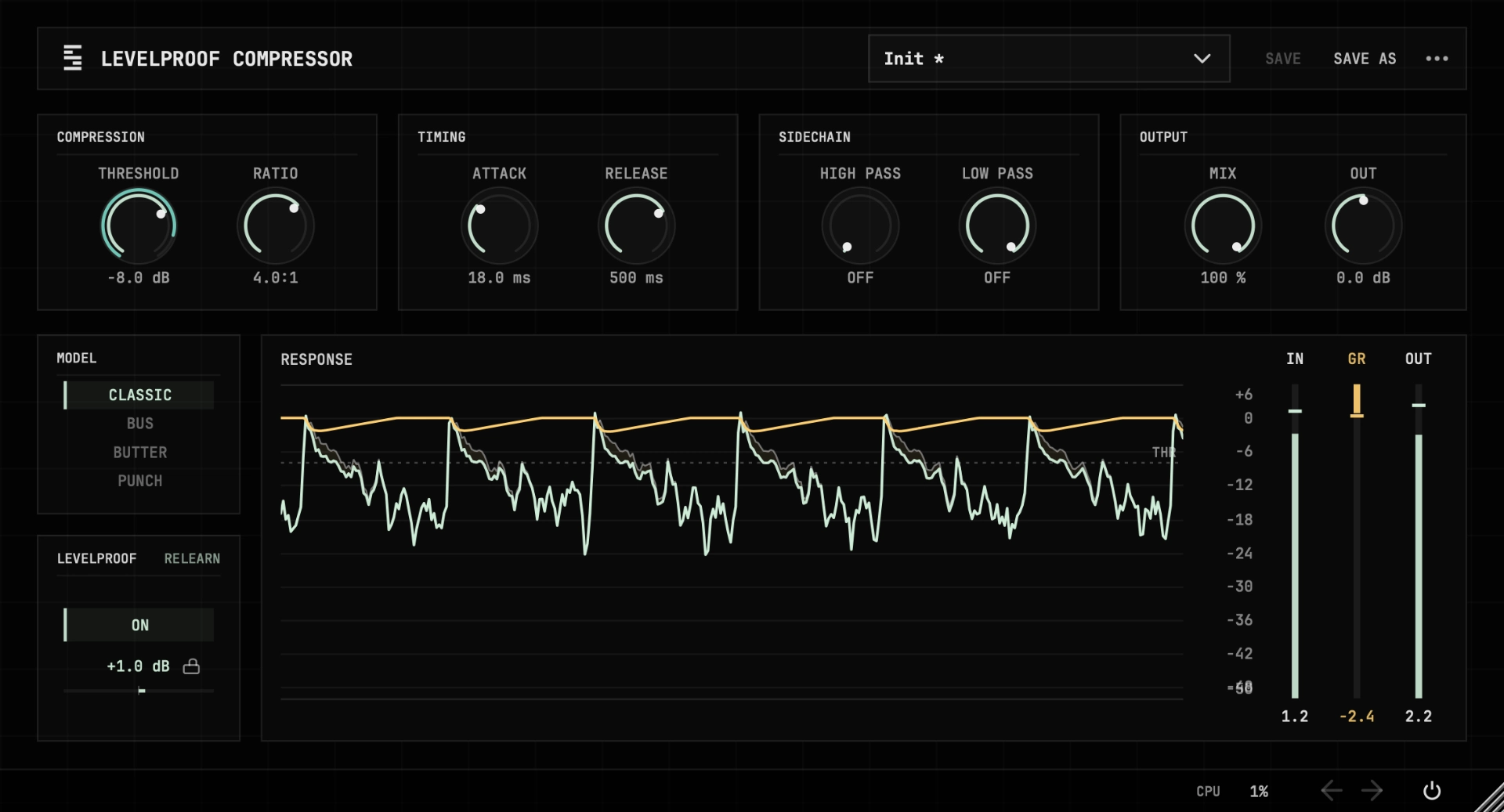
Every setting lands at the same loudness. The compressor measures how much loudness the compression costs and gives exactly that much back.
$29
Activate once with a serial number and use it offline on up to five devices, with free updates for life.
The demo has no time limit and adds occasional noise bursts. Activation requires a Stemwire account. By buying, you agree to the Terms and Software Licence, request immediate access, and acknowledge that your right to withdraw ends when delivery begins.
Covered by
- Rekkerd.org19 Aug 2026
- Noizefield17 Aug 2026
- KVR Audio17 Aug 2026
Listen at the same level
Half a decibel is enough to win an A/B before you hear what the compressor actually did. Levelproof measures the loudness change in LUFS and applies the makeup as you work.
Levelproof compares the K-weighted loudness of the input and compressed signal over a short window under BS.1770 gating. The difference becomes the makeup gain, which stays fixed until you adjust a control or press RELEARN.
There are four compressor models: CLASSIC, BUS, BUTTER and PUNCH. Each handles gain reduction in its own way. With Levelproof on, the loudness is matched each time you switch models, so you can hear which one fits the source best.
As you’d expect from a compressor, it has threshold, ratio, attack, release and mix for parallel compression. Levelproof is especially useful when dialling in attack and release.
Specifications
- Models
- Four compressor models: Classic, Bus, Butter and Punch.
- Controls
- Threshold, ratio, attack, release and output, plus Levelproof and bypass.
- Detector
- Sidechain high pass and low pass from 20 Hz to 20 kHz, on every model. The filters shape what the compressor listens to, not what you hear.
- Loudness match
- K-weighted measurement of both the input and the output. It measures when you turn a knob or press Relearn, then locks, so bounces, renders and project reloads use the same value.
- Formats
- VST3 and AU on macOS, VST3 on Windows.
- Documentation
- Read the manual
Changelog
1.0.016 Aug 2026
- First release.
FAQ
- How is this different from auto-makeup gain?
- Auto-makeup gain applies a fixed offset estimated from the threshold and ratio. Levelproof Compressor measures K-weighted loudness of both the input and the output and corrects the difference. The match is based on the actual audio, not a static estimate.
- What happens when I change a setting during playback?
- Levelproof Compressor uses a short buffer of recent audio to predict the new level straight away. Once you stop adjusting, it locks the result.
- Does the loudness match update continuously?
- No. Levelproof Compressor measures when you turn a knob or press Relearn. Once the measurement settles, the gain stays where it landed and does not drift. Bounces, renders, and project reloads use that same value.
- When do I need to press Relearn?
- Relearn clears the current loudness measurement and starts matching from scratch using the audio playing at that moment. Use it when you want a fresh match without changing any settings.